Code Sketch
jAY HO [alok]
Category: Art
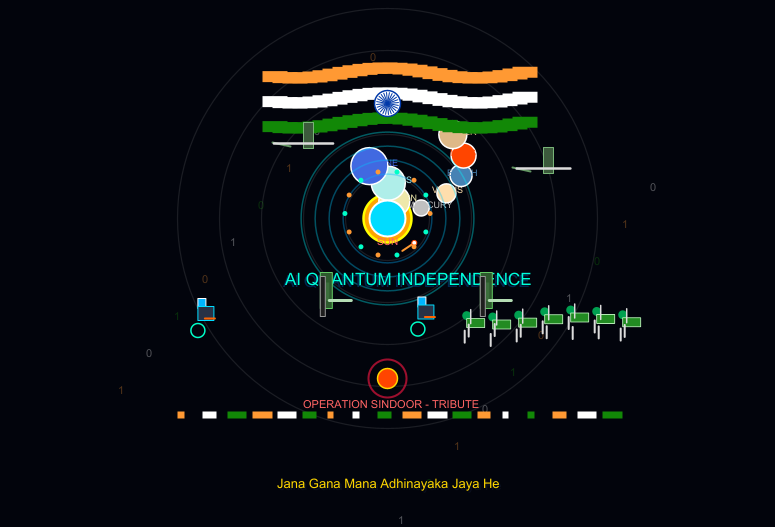
// --- AI Quantum-Matrix Independence Day Celebration with Scaled Up Solar System Sizes, Futuristic Robots, Helicopters, Soldiers, Tanks & Fast Anthem ---

cleari()

var timeStep = 0.0

// National Anthem verses
val anthemVerses = Array(
  "Jana Gana Mana Adhinayaka Jaya He",
  "Bhagya Vidhata",
  "Punjab Sindh Gujarat Maratha",
  "Dravida Utkala Banga",
  "Vindhya Himachal Yamuna Ganga",
  "Uchchala Jaladhi Taranga",
  "Tava Shubha Name Jage",
  "Tava Shubha Ashish Mange",
  "Gaaye Tava Jaya Ganatha",
  "Jana Gana Mana Mangala Dayaka Jaya He",
  "Jaya Hey, Jaya Hey, Jaya Hey,",
  "Jaya Jaya Jaya, Jaya Hey!"
)

// Solar system planets list with names
val planets = Array(
  "MERCURY", "VENUS", "EARTH", "MARS", "JUPITER", "SATURN", "URANUS", "NEPTUNE"
)

animateWithState(0.0) { angle =>
  erasePictures()

  // 1. Deep Cyber-Matrix Space Background
  setBackground(Color(2, 4, 12))

  // Digital Rain / Matrix Grid Effect
  for (col <- 0 until 20) {
    val dropX = -270 + col * 28
    val dropY = ((timeStep * 3 + col * 37) % 500) - 250
    val codeChar = Picture.text(if ((col + angle.toInt) % 2 == 0) "1" else "0", 11)
    codeChar.setPenColor(if (col % 3 == 0) Color(255, 153, 51, 80) else if (col % 3 == 1) Color(255, 255, 255, 80) else Color(18, 136, 7, 80))
    codeChar.setPosition(dropX, dropY)
    draw(codeChar)
  }

  // 1.5 Solar System Orbit Rings & Revolving Planets with Enlarged Sizes
  for (orbitRing <- 1 to 5) {
    val rCircle = Picture.circle(42.0 * orbitRing)
    rCircle.setFillColor(noColor)
    rCircle.setPenColor(Color(255, 255, 255, 25))
    rCircle.setPenThickness(1.2)
    rCircle.setPosition(0, 45)
    draw(rCircle)
  }

  // Enlarged Sun Core in background
  val sunCore = Picture.circle(24.0)
  sunCore.setFillColor(Color(255, 165, 0))
  sunCore.setPenColor(Color(255, 255, 0))
  sunCore.setPenThickness(2.5)
  sunCore.setPosition(0, 45)
  draw(sunCore)

  val sunLabel = Picture.text("SUN", 10)
  sunLabel.setPenColor(Color(255, 100, 100))
  sunLabel.setPosition(-11, 30)
  draw(sunLabel)

  // Revolving Planets with Significantly Larger Sizes & Matching Custom Colors
  for (p <- 0 until planets.length) {
    val orbitRadius = 42.0 * ((p % 5) + 1)
    val planetAngle = angle * (0.005 + p * 0.0012)
    val px = Math.cos(planetAngle) * orbitRadius
    val py = 45.0 + Math.sin(planetAngle) * (orbitRadius * 0.42)

    // Assigning distinct vibrant colors to each planet
    val planetColor = p match {
      case 0 => Color(192, 192, 192) // Mercury - Silver Gray
      case 1 => Color(255, 222, 173) // Venus - Warm Peach/Gold
      case 2 => Color(70, 130, 180)  // Earth - Steel Blue
      case 3 => Color(255, 69, 0)    // Mars - Vivid Red-Orange
      case 4 => Color(222, 184, 135) // Jupiter - Tan/Brown
      case 5 => Color(238, 232, 170) // Saturn - Pale Golden
      case 6 => Color(175, 238, 233) // Uranus - Pale Turquoise
      case _ => Color(65, 105, 225)  // Neptune - Royal Blue
    }

    // Increased planet radius size (doubled/tripled for larger appearance)
    val planetObj = Picture.circle(8.0 + (p * 1.5))
    planetObj.setFillColor(planetColor)
    planetObj.setPenColor(Color(255, 255, 255))
    planetObj.setPenThickness(1.5)
    planetObj.setPosition(px, py)
    draw(planetObj)

    // Planet Name Text Label matching its color
    val planetName = Picture.text(planets(p), 9)
    planetName.setPenColor(planetColor)
    planetName.setPosition(px - 14, py + 10)
    draw(planetName)
  }

  // 2. Central AI Quantum Hologram Core
  val pulse = Math.sin(angle * 0.07) * 12.0
  for (ring <- 1 to 4) {
    val holoRing = Picture.circle(25 + ring * 14 + pulse)
    holoRing.setFillColor(noColor)
    holoRing.setPenColor(Color(0, 150 + ring * 25, 255, 90))
    holoRing.setPenThickness(1.5)
    holoRing.setPosition(0, 45)
    draw(holoRing)
  }

  // AI Core Central Hub
  val coreHub = Picture.circle(18)
  coreHub.setFillColor(Color(0, 220, 255))
  coreHub.setPenColor(Color(255, 255, 255))
  coreHub.setPenThickness(2)
  coreHub.setPosition(0, 45)
  draw(coreHub)

  // 3. Holographic Tricolour Wave Banner (Top Center)
  val bWidth = 260.0
  val bHeight = 75.0
  val cols = 26
  val cWidth = bWidth / cols

  for (c <- 0 until cols) {
    val wave = Math.sin(angle * 0.08 + c * 0.35) * 5.0
    val bx = -130.0 + (c * cWidth)

    // Saffron Stripe
    val sStrip = Picture.rect(cWidth + 1.0, bHeight / 3)
    sStrip.setFillColor(Color(255, 153, 51))
    sStrip.setPenColor(noColor)
    sStrip.setPosition(bx + cWidth/2, 185 + wave)
    draw(sStrip)

    // White Stripe
    val wStrip = Picture.rect(cWidth + 1.0, bHeight / 3)
    wStrip.setFillColor(Color(255, 255, 255))
    wStrip.setPenColor(noColor)
    wStrip.setPosition(bx + cWidth/2, 160 + wave)
    draw(wStrip)

    // Green Stripe
    val gStrip = Picture.rect(cWidth + 1.0, bHeight / 3)
    gStrip.setFillColor(Color(18, 136, 7))
    gStrip.setPenColor(noColor)
    gStrip.setPosition(bx + cWidth/2, 135 + wave)
    draw(gStrip)
  }

  // Rotating Quantum Ashok Chakra in Banner Center
  val qChakraX = 0.0
  val qChakraY = 160.0
  val chakraBack = Picture.circle(13)
  chakraBack.setFillColor(Color(255, 255, 255))
  chakraBack.setPenColor(Color(0, 56, 168))
  chakraBack.setPenThickness(1.5)
  chakraBack.setPosition(qChakraX, qChakraY)
  draw(chakraBack)

  for (spk <- 0 until 24) {
    val sAngle = Math.toRadians(spk * 15 + angle * 2.5)
    val lx = Math.cos(sAngle) * 11
    val ly = Math.sin(sAngle) * 11
    val spokeLine = Picture.line(lx, ly)
    spokeLine.setPenColor(Color(0, 56, 168))
    spokeLine.setPenThickness(1.0)
    spokeLine.setPosition(qChakraX, qChakraY)
    draw(spokeLine)
  }

  // 4. AI Neon Title Header
  val headerShadow = Picture.text("AI QUANTUM INDEPENDENCE", 17)
  headerShadow.setPenColor(Color(0, 40, 80))
  headerShadow.setPosition(-105, -5)
  draw(headerShadow)

  val headerText = Picture.text("AI QUANTUM INDEPENDENCE", 17)
  headerText.setPenColor(Color(0, 255, 220))
  headerText.setPosition(-103, -3)
  draw(headerText)

  // 5. Flying Helicopters Across the Sky
  val heliXOffset = ((timeStep * 1.5) % 600) - 300
  for (heliIndex <- 0 until 2) {
    val heliX = heliXOffset + (heliIndex * 240)
    val heliY = 100.0 + (if (heliIndex == 0) 15.0 else -10.0)

    if (heliX >= -280 && heliX <= 280) {
      val cabin = Picture.rect(26, 10)
      cabin.setFillColor(Color(60, 90, 60))
      cabin.setPenColor(Color(120, 180, 120))
      cabin.setPenThickness(1.0)
      cabin.setPosition(heliX, heliY)
      draw(cabin)

      val tail = Picture.line(-18, 4)
      tail.setPenColor(Color(100, 150, 100))
      tail.setPenThickness(2.0)
      tail.setPosition(heliX - 13, heliY + 2)
      draw(tail)

      val rotorWidth = 18.0 + Math.sin(timeStep * 0.8 + heliIndex) * 12.0
      val rotor = Picture.line(rotorWidth * 2, 0)
      rotor.setPenColor(Color(220, 220, 220))
      rotor.setPenThickness(2.5)
      rotor.setPosition(heliX - rotorWidth, heliY + 5)
      draw(rotor)
    }
  }

  // 6. Military Tanks Rolling & Firing Missiles
  val tankXOffset = ((timeStep * 1.2) % 480) - 240
  for (tankIndex <- 0 until 2) {
    val tankX = tankXOffset + (tankIndex * 160)
    if (tankX >= -260 && tankX <= 260) {
      val tankHull = Picture.rect(36, 12)
      tankHull.setFillColor(Color(45, 90, 45))
      tankHull.setPenColor(Color(100, 200, 100))
      tankHull.setPenThickness(1.0)
      tankHull.setPosition(tankX, -45)
      draw(tankHull)

      val tankTurret = Picture.rect(18, 9)
      tankTurret.setFillColor(Color(60, 110, 60))
      tankTurret.setPenColor(noColor)
      tankTurret.setPosition(tankX, -37)
      draw(tankTurret)

      val tankCannon = Picture.line(22, 0)
      tankCannon.setPenColor(Color(180, 220, 180))
      tankCannon.setPenThickness(3.0)
      tankCannon.setPosition(tankX + 9, -37)
      draw(tankCannon)

      val tankTracks = Picture.rect(40, 5)
      tankTracks.setFillColor(Color(30, 30, 30))
      tankTracks.setPenColor(Color(150, 150, 150))
      tankTracks.setPenThickness(1.0)
      tankTracks.setPosition(tankX, -53)
      draw(tankTracks)

      val missileCycle = (timeStep * 4.5 + tankIndex * 40) % 120.0
      if (missileCycle < 75.0) {
        val missileX = (tankX + 22) + (missileCycle * 1.5)
        val missileY = -37 + (missileCycle * 1.2)

        val missileTrail = Picture.line(-12, -8)
        missileTrail.setPenColor(Color(255, 153, 51))
        missileTrail.setPenThickness(2.0)
        missileTrail.setPosition(missileX, missileY)
        draw(missileTrail)

        val missileHead = Picture.circle(2.5)
        missileHead.setFillColor(Color(255, 255, 255))
        missileHead.setPenColor(Color(255, 69, 0))
        missileHead.setPenThickness(1.0)
        missileHead.setPosition(missileX, missileY)
        draw(missileHead)
      }
    }
  }

  // 7. Extended Army Parade: 20 Soldiers Marching in Front
  val paradeXOffset = ((timeStep * 1.8) % 600) - 300

  for (soldierIndex <- 0 until 20) {
    val soldierX = paradeXOffset + (soldierIndex * 26)
    if (soldierX >= -240 && soldierX <= 240) {
      val marchBob = Math.sin(timeStep * 0.4 + soldierIndex) * 3.5

      val helmet = Picture.circle(4.5)
      helmet.setFillColor(Color(0, 160, 80))
      helmet.setPenColor(noColor)
      helmet.setPosition(soldierX, -50 + marchBob)
      draw(helmet)

      val body = Picture.rect(9, 18)
      body.setFillColor(Color(34, 139, 34))
      body.setPenColor(Color(200, 255, 200))
      body.setPenThickness(0.8)
      body.setPosition(soldierX, -62 + marchBob)
      draw(body)

      val rifle = Picture.line(0, 14)
      rifle.setPenColor(Color(220, 220, 220))
      rifle.setPenThickness(1.5)
      rifle.setPosition(soldierX + 4, -58 + marchBob)
      draw(rifle)

      val legOffset = Math.sin(timeStep * 0.4 + soldierIndex) * 5.0
      val leftLeg = Picture.line(0, 12)
      leftLeg.setPenColor(Color(220, 220, 220))
      leftLeg.setPenThickness(2.0)
      leftLeg.setPosition(soldierX - 2, -74 + marchBob + legOffset)
      draw(leftLeg)

      val rightLeg = Picture.line(0, 12)
      rightLeg.setPenColor(Color(220, 220, 220))
      rightLeg.setPenThickness(2.0)
      rightLeg.setPosition(soldierX + 2, -74 + marchBob - legOffset)
      draw(rightLeg)
    }
  }

  // 8. Futuristic AI Defense Robots Marching Alongside
  val robotXOffset = ((timeStep * 1.6) % 520) - 260
  for (robotIndex <- 0 until 2) {
    val robotX = robotXOffset + (robotIndex * 220)
    if (robotX >= -250 && robotX <= 250) {
      val robotBob = Math.sin(timeStep * 0.5 + robotIndex) * 3.0

      val robotHead = Picture.rect(10, 8)
      robotHead.setFillColor(Color(0, 180, 255))
      robotHead.setPenColor(Color(255, 255, 255))
      robotHead.setPenThickness(1.0)
      robotHead.setPosition(robotX, -42 + robotBob)
      draw(robotHead)

      val robotBody = Picture.rect(14, 16)
      robotBody.setFillColor(Color(40, 50, 70))
      robotBody.setPenColor(Color(0, 220, 255))
      robotBody.setPenThickness(1.0)
      robotBody.setPosition(robotX, -54 + robotBob)
      draw(robotBody)

      val robotArm = Picture.line(10, 0)
      robotArm.setPenColor(Color(255, 100, 0))
      robotArm.setPenThickness(2.0)
      robotArm.setPosition(robotX + 7, -52 + robotBob)
      draw(robotArm)

      val robotBase = Picture.circle(7.0)
      robotBase.setFillColor(noColor)
      robotBase.setPenColor(Color(0, 255, 200))
      robotBase.setPenThickness(1.5)
      robotBase.setPosition(robotX, -64 + robotBob)
      draw(robotBase)
    }
  }

  // 9. Operation Sindoor Flame & Memorial Tribute Emblem
  val flamePulsate = Math.sin(angle * 0.15) * 3.0

  val flameOuter = Picture.circle(18 + flamePulsate)
  flameOuter.setFillColor(noColor)
  flameOuter.setPenColor(Color(220, 20, 60, 180))
  flameOuter.setPenThickness(2.0)
  flameOuter.setPosition(0, -115)
  draw(flameOuter)

  val flameCore = Picture.circle(10)
  flameCore.setFillColor(Color(255, 69, 0))
  flameCore.setPenColor(Color(255, 215, 0))
  flameCore.setPenThickness(1.5)
  flameCore.setPosition(0, -115)
  draw(flameCore)

  val opText = Picture.text("OPERATION SINDOOR - TRIBUTE", 11)
  opText.setPenColor(Color(255, 100, 100))
  opText.setPosition(-85, -132)
  draw(opText)

  // 10. Digital Spectrum Audio Visualizer
  for (bar <- 0 until 18) {
    val heightVal = (Math.abs(Math.sin(angle * 0.1 + bar * 0.45)) * 18).toInt + 3
    val spectrumBar = Picture.rect(7, heightVal)
    spectrumBar.setFillColor(if (bar % 3 == 0) Color(255, 153, 51) else if (bar % 3 == 1) Color(255, 255, 255) else Color(18, 136, 7))
    spectrumBar.setPenColor(noColor)
    spectrumBar.setPosition(-210 + (bar * 25), -155)
    draw(spectrumBar)
  }

  // 11. Fast National Anthem Ticker at Bottom
  val verseIndex = ((angle * 0.0035).toInt) % anthemVerses.length
  val activeVerse = anthemVerses(verseIndex)

  val verseShadow = Picture.text(activeVerse, 13)
  verseShadow.setPenColor(Color(10, 15, 30))
  verseShadow.setPosition(- (activeVerse.length * 3.3), -212)
  draw(verseShadow)

  val verseMain = Picture.text(activeVerse, 13)
  verseMain.setPenColor(Color(255, 215, 0))
  verseMain.setPosition(- (activeVerse.length * 3.3) - 2, -210)
  draw(verseMain)

  // 12. Holographic Quantum Fireworks Particles
  val burstTimer = (angle * 0.09) % 10.0
  if (burstTimer < 6.0) {
    for (pt <- 0 until 14) {
      val ptAngle = pt * (Math.PI / 7)
      val ptDist = burstTimer * 28.0
      val px = Math.cos(ptAngle) * ptDist
      val py = 50 + Math.sin(ptAngle) * ptDist
      val particle = Picture.circle(2.5)
      particle.setFillColor(if (pt % 2 == 0) Color(255, 153, 51) else Color(0, 255, 200))
      particle.setPenColor(noColor)
      particle.setPosition(px, py)
      draw(particle)
    }
  }

  timeStep += 1.0
  (angle + 2.0) % 360.0
}