Code Sketch
navya temburne
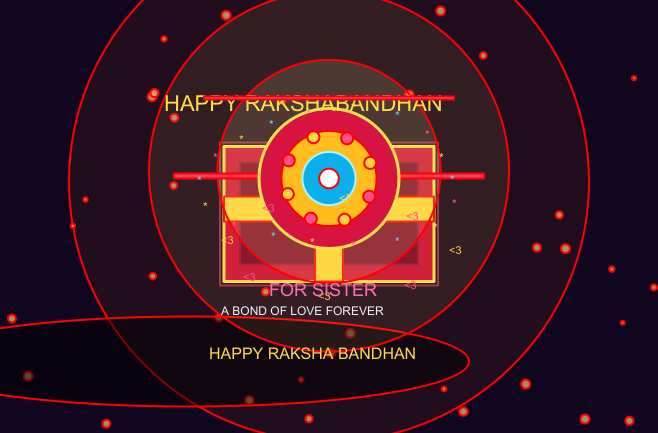
clear()
setBackground(Color(8, 4, 22))

// ============================================================
// RAKSHA BANDHAN MAGIC GIFT
// CLEAN ADVANCED STEP-BY-STEP ANIMATION
// ============================================================

val sisterName = "SISTER"

var opened = false
var step = 0

var lidY = 62.0
var lidAngle = 0.0

var glow = 0.0
var rakhiSize = 0.0
var sparkleRadius = 0.0

var titleIndex = 0
var titleTimer = 0

var celebration = 0.0
var rotateAngle = 0.0

val title = "HAPPY RAKSHABANDHAN"

// ============================================================
// BACKGROUND STARS
// ============================================================

val starX =
  Array.fill(45)(
    Math.random() * 700.0 - 350.0
  )

val starY =
  Array.fill(45)(
    Math.random() * 420.0 - 210.0
  )

// ============================================================
// HELPER
// ============================================================

def clamp(
    v: Double,
    lo: Double,
    hi: Double
): Double = {
  math.max(
    lo,
    math.min(
      hi,
      v
    )
  )
}

// ============================================================
// BACKGROUND
// ============================================================

def drawBackground(): Unit = {

  erasePictures()

  val bg =
    Picture.rectangle(
      760,
      520
    )

  bg.setFillColor(
    Color(
      8,
      4,
      22
    )
  )

  bg.setPosition(
    -380,
    -260
  )

  draw(bg)

  // Purple glow
  val purpleGlow =
    Picture.circle(
      420
    )

  purpleGlow.setFillColor(
    Color(
      100,
      20,
      120,
      25
    )
  )

  purpleGlow.setPosition(
    0,
    20
  )

  draw(purpleGlow)

  // Golden glow
  val goldGlow =
    Picture.circle(
      260
    )

  goldGlow.setFillColor(
    Color(
      220,
      120,
      20,
      18
    )
  )

  goldGlow.setPosition(
    0,
    35
  )

  draw(goldGlow)

  // Stars
  for (i <- 0 until 45) {

    val size =
      2.0 +
      Math.abs(
        Math.sin(
          celebration + i
        )
      ) * 2.5

    val star =
      Picture.circle(
        size
      )

    star.setFillColor(
      Color(
        255,
        220,
        130,
        160
      )
    )

    star.setPosition(
      starX(i),
      starY(i)
    )

    draw(star)
  }
}

// ============================================================
// BOX SHADOW
// ============================================================

def drawShadow(): Unit = {

  val shadow =
    Picture.ellipse(
      280,
      45
    )

  shadow.setFillColor(
    Color(
      0,
      0,
      0,
      120
    )
  )

  shadow.setPosition(
    -140,
    -145
  )

  draw(shadow)
}

// ============================================================
// BOX BODY
// ============================================================

def drawBox(): Unit = {

  val box =
    Picture.rectangle(
      210,
      135
    )

  box.setFillColor(
    Color(
      205,
      15,
      55
    )
  )

  box.setPenColor(
    Color(
      255,
      220,
      70
    )
  )

  box.setPenThickness(
    3
  )

  box.setPosition(
    -105,
    -65
  )

  draw(box)

  // Inner panel
  val inner =
    Picture.rectangle(
      178,
      102
    )

  inner.setFillColor(
    Color(
      125,
      8,
      42
    )
  )

  inner.setPenColor(
    Color(
      155,
      20,
      60
    )
  )

  inner.setPosition(
    -89,
    -48
  )

  draw(inner)

  // Vertical ribbon
  val ribbonV =
    Picture.rectangle(
      28,
      135
    )

  ribbonV.setFillColor(
    Color(
      255,
      215,
      55
    )
  )

  ribbonV.setPosition(
    -14,
    -65
  )

  draw(ribbonV)

  // Horizontal ribbon
  val ribbonH =
    Picture.rectangle(
      210,
      25
    )

  ribbonH.setFillColor(
    Color(
      255,
      215,
      55
    )
  )

  ribbonH.setPosition(
    -105,
    -5
  )

  draw(ribbonH)

  // Edge glow
  val edge =
    Picture.rectangle(
      218,
      143
    )

  edge.setFillColor(
    Color(
      255,
      255,
      255,
      0
    )
  )

  edge.setPenColor(
    Color(
      255,
      80,
      120,
      130
    )
  )

  edge.setPenThickness(
    2
  )

  edge.setPosition(
    -109,
    -69
  )

  draw(edge)
}

// ============================================================
// BOX LID
// ============================================================

def drawLid(): Unit = {

  if (lidY < 230) {

    val lid =
      Picture.rectangle(
        235,
        38
      )

    lid.setFillColor(
      Color(
        180,
        8,
        42
      )
    )

    lid.setPenColor(
      Color(
        255,
        225,
        85
      )
    )

    lid.setPenThickness(
      3
    )

    lid.setPosition(
      -118,
      lidY
    )

    lid.rotate(
      lidAngle
    )

    draw(lid)

    // Lid highlight
    val shine =
      Picture.rectangle(
        175,
        4
      )

    shine.setFillColor(
      Color(
        255,
        240,
        160,
        180
      )
    )

    shine.setPosition(
      -88,
      lidY + 5
    )

    shine.rotate(
      lidAngle
    )

    draw(shine)
  }
}

// ============================================================
// MAGICAL LIGHT
// ============================================================

def drawMagicLight(): Unit = {

  if (step >= 2) {

    val r =
      clamp(
        glow,
        5.0,
        210.0
      )

    val light =
      Picture.circle(
        r
      )

    light.setFillColor(
      Color(
        255,
        210,
        80,
        22
      )
    )

    light.setPosition(
      0,
      45
    )

    draw(light)

    val light2 =
      Picture.circle(
        r * 0.62
      )

    light2.setFillColor(
      Color(
        255,
        235,
        150,
        32
      )
    )

    light2.setPosition(
      0,
      45
    )

    draw(light2)
  }
}

// ============================================================
// RAKHI
// ============================================================

def drawRakhi(): Unit = {

  if (rakhiSize <= 0)
    return

  // Threads
  val left =
    Picture.rectangle(
      130,
      5
    )

  left.setFillColor(
    Color(
      255,
      60,
      90
    )
  )

  left.setPosition(
    -155,
    38
  )

  draw(left)

  val right =
    Picture.rectangle(
      130,
      5
    )

  right.setFillColor(
    Color(
      255,
      60,
      90
    )
  )

  right.setPosition(
    25,
    38
  )

  draw(right)

  // Outer circle
  val outer =
    Picture.circle(
      rakhiSize
    )

  outer.setFillColor(
    Color(
      215,
      20,
      65
    )
  )

  outer.setPenColor(
    Color(
      255,
      225,
      80
    )
  )

  outer.setPenThickness(
    3
  )

  outer.setPosition(
    0,
    38
  )

  draw(outer)

  // Gold
  val gold =
    Picture.circle(
      rakhiSize * 0.68
    )

  gold.setFillColor(
    Color(
      255,
      190,
      30
    )
  )

  gold.setPosition(
    0,
    38
  )

  draw(gold)

  // Blue center
  val blue =
    Picture.circle(
      rakhiSize * 0.38
    )

  blue.setFillColor(
    Color(
      10,
      175,
      235
    )
  )

  blue.setPenColor(
    Color(
      170,
      245,
      255
    )
  )

  blue.setPenThickness(
    2
  )

  blue.setPosition(
    0,
    38
  )

  draw(blue)

  // White jewel
  val jewel =
    Picture.circle(
      rakhiSize * 0.14
    )

  jewel.setFillColor(
    Color(
      255,
      255,
      255
    )
  )

  jewel.setPosition(
    0,
    38
  )

  draw(jewel)

  // Rotating beads
  for (i <- 0 until 8) {

    val angle =
      rotateAngle +
      i * 45.0

    val rad =
      Math.toRadians(
        angle
      )

    val bx =
      Math.cos(rad) *
      (rakhiSize * 0.63)

    val by =
      38.0 +
      Math.sin(rad) *
      (rakhiSize * 0.63)

    val bead =
      Picture.circle(
        6
      )

    if (i % 2 == 0) {

      bead.setFillColor(
        Color(
          255,
          215,
          60
        )
      )

    } else {

      bead.setFillColor(
        Color(
          255,
          80,
          135
        )
      )
    }

    bead.setPosition(
      bx,
      by
    )

    draw(bead)
  }
}

// ============================================================
// SPARKLES
// ============================================================

def drawSparkles(): Unit = {

  if (!opened)
    return

  for (i <- 0 until 18) {

    val angle =
      rotateAngle +
      i * 20.0

    val rad =
      Math.toRadians(
        angle
      )

    val radius =
      sparkleRadius +
      math.sin(
        celebration + i
      ) * 10.0

    val x =
      math.cos(rad) *
      radius

    val y =
      45.0 +
      math.sin(rad) *
      radius *
      0.55

    val star =
      Picture.text(
        "*",
        12
      )

    if (i % 3 == 0) {

      star.setPenColor(
        Color(
          255,
          220,
          80
        )
      )

    } else if (i % 3 == 1) {

      star.setPenColor(
        Color(
          255,
          90,
          160
        )
      )

    } else {

      star.setPenColor(
        Color(
          100,
          220,
          255
        )
      )
    }

    star.setPosition(
      x,
      y
    )

    draw(star)
  }
}

// ============================================================
// HEARTS
// ============================================================

def drawHearts(): Unit = {

  if (step < 4)
    return

  for (i <- 0 until 8) {

    val angle =
      celebration * 0.8 +
      i * 45.0

    val rad =
      Math.toRadians(
        angle
      )

    val radius =
      100.0 +
      i * 3.0

    val x =
      Math.cos(rad) *
      radius

    val y =
      -20.0 +
      Math.sin(rad) *
      radius * 0.45

    val heart =
      Picture.text(
        "<3",
        11
      )

    if (i % 2 == 0) {

      heart.setPenColor(
        Color(
          255,
          80,
          140
        )
      )

    } else {

      heart.setPenColor(
        Color(
          255,
          205,
          70
        )
      )
    }

    heart.setPosition(
      x,
      y
    )

    draw(heart)
  }
}

// ============================================================
// TITLE
// ============================================================

def drawTitle(): Unit = {

  if (titleIndex <= 0)
    return

  val shown =
    title.substring(
      0,
      titleIndex
    )

  val text =
    Picture.text(
      shown,
      22
    )

  text.setPenColor(
    Color(
      255,
      220,
      70
    )
  )

  text.setPosition(
    -165,
    130
  )

  draw(text)

  if (
    titleIndex >=
    title.length
  ) {

    val line =
      Picture.rectangle(
        250,
        3
      )

    line.setFillColor(
      Color(
        255,
        90,
        150
      )
    )

    line.setPosition(
      -125,
      117
    )

    draw(line)

    val name =
      Picture.text(
        "FOR " + sisterName,
        18
      )

    name.setPenColor(
      Color(
        255,
        110,
        180
      )
    )

    name.setPosition(
      -60,
      -60
    )

    draw(name)

    val msg =
      Picture.text(
        "A BOND OF LOVE FOREVER",
        12
      )

    msg.setPenColor(
      Color(
        240,
        240,
        250
      )
    )

    msg.setPosition(
      -108,
      -85
    )

    draw(msg)

    val finalText =
      Picture.text(
        "HAPPY RAKSHA BANDHAN",
        16
      )

    finalText.setPenColor(
      Color(
        255,
        215,
        70
      )
    )

    finalText.setPosition(
      -120,
      -125
    )

    draw(finalText)
  }
}

// ============================================================
// INSTRUCTION
// ============================================================

def drawInstruction(): Unit = {

  if (!opened) {

    val msg =
      Picture.text(
        "MOVE CURSOR / CLICK BOX TO OPEN MAGIC",
        13
      )

    msg.setPenColor(
      Color(
        255,
        215,
        70
      )
    )

    msg.setPosition(
      -140,
      -155
    )

    draw(msg)
  }
}

// ============================================================
// COMPLETE SCENE
// ============================================================

def drawScene(): Unit = {

  drawBackground()

  drawShadow()

  drawBox()

  drawMagicLight()

  drawRakhi()

  drawLid()

  drawSparkles()

  drawHearts()

  drawTitle()

  drawInstruction()
}

// ============================================================
// FIRST FRAME
// ============================================================

drawScene()

// ============================================================
// ANIMATION LOOP
// ============================================================

animateWithState(0.0) { frame =>

  celebration += 0.06
  rotateAngle += 0.9

  if (opened) {

    // STEP 1 - OPEN LID
    if (step == 1) {

      lidY += 4.5
      lidAngle += 2.7

      if (lidY >= 225) {

        lidY = 225
        step = 2
      }
    }

    // STEP 2 - LIGHT
    if (step == 2) {

      glow += 8.0

      if (glow >= 180) {

        glow = 180
        step = 3
      }
    }

    // STEP 3 - RAKHI
    if (step == 3) {

      rakhiSize += 2.3

      if (rakhiSize >= 70) {

        rakhiSize = 70
        sparkleRadius = 60
        step = 4
      }
    }

    // STEP 4 - SPARKLES
    if (step == 4) {

      sparkleRadius += 1.5

      if (sparkleRadius >= 125) {

        sparkleRadius = 125
        step = 5
      }
    }

    // STEP 5 - TITLE
    if (step == 5) {

      titleTimer += 1

      if (
        titleTimer % 5 == 0 &&
        titleIndex < title.length
      ) {

        titleIndex += 1
      }
    }
  }

  drawScene()

  frame + 1.0
}

// ============================================================
// MOUSE OPEN
// ============================================================

onMouseMove { (x, y) =>

  if (!opened) {

    if (
      x >= -120 &&
      x <= 120 &&
      y >= -50 &&
      y <= 125
    ) {

      opened = true
      step = 1

      lidY = 62
      lidAngle = 0

      glow = 0
      rakhiSize = 0
      sparkleRadius = 0

      titleIndex = 0
      titleTimer = 0

      try {
        playNote(
          72,
          220
        )
      } catch {
        case _: Exception =>
      }
    }
  }
}