Code Sketch
sanavi pawar piano
Category: Programming
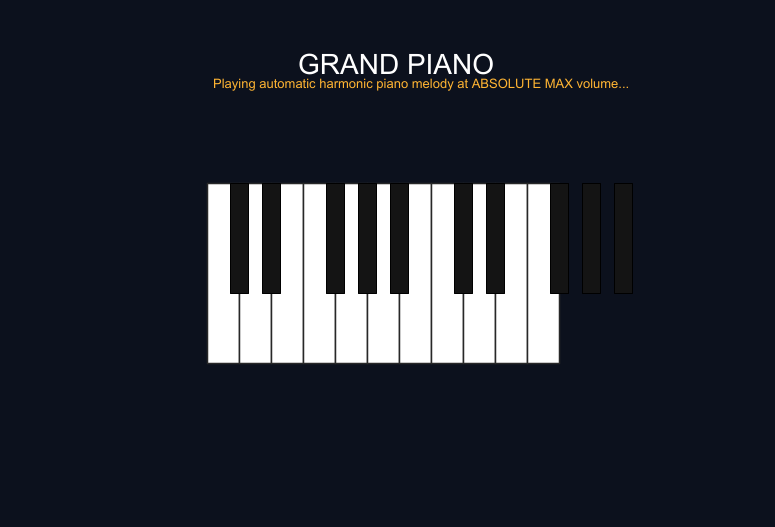
clear()

// ===================================================== //
// VIRTUAL PIANO (ULTRA-AMPLIFIED GRAND PIANO ENGINE)    //
// ===================================================== //

// Dark studio background to focus completely on the keys
setBackground(ColorMaker.hsl(222, 0.40, 0.08))

// ----------------------------------------------------- //
// UI Text Labels                                        //
// ----------------------------------------------------- //
val title = Picture {
    setPenColor(white)
    setPenFontSize(28)
    write("GRAND PIANO")
}
title.setPosition(-90, 220)
draw(title)

val subtitle = Picture {
    setPenColor(ColorMaker.rgb(255, 180, 50))
    setPenFontSize(13)
    write("Playing automatic harmonic piano melody at ABSOLUTE MAX volume...")
}
subtitle.setPosition(-175, 190)
draw(subtitle)

// ===================================================== //
// MATHEMATICALLY DESIGNED PIANO KEYBOARD GRAPHICS      //
// ===================================================== //
val startX = -180
val startY = -100
val whiteWidth = 32
val whiteHeight = 180
val blackWidth = 18
val blackHeight = 110

// 1. Draw 11 White Keys side by side
var w = 0
repeat(11) {
    val whiteKey = Picture {
        setFillColor(white)
        setPenColor(ColorMaker.rgb(40, 40, 40))
        setPenThickness(1.5)

        // Draw white key rectangle
        repeat(2) {
            forward(whiteHeight)
            right(90)
            forward(whiteWidth)
            right(90)
        }
    }
    whiteKey.setPosition(startX + (w * whiteWidth), startY)
    draw(whiteKey)
    w = w + 1
}

// 2. Overlay Black Keys (Patterned Accurately across Octaves)
val blackKeyOffsets = Array(1, 2, 4, 5, 6, 8, 9, 11, 12, 13)
var b = 0
repeat(10) {
    val keyIndex = blackKeyOffsets(b)
    val blackKey = Picture {
        setFillColor(ColorMaker.rgb(20, 20, 20))
        setPenColor(black)
        setPenThickness(1)

        // Draw black key rectangle
        repeat(2) {
            forward(blackHeight)
            right(90)
            forward(blackWidth)
            right(90)
        }
    }
    // Align perfectly centered between white key gaps
    blackKey.setPosition(startX + (keyIndex * whiteWidth) - (blackWidth / 2), startY + (whiteHeight - blackHeight))
    draw(blackKey)
    b = b + 1
}

invisible()

// ===================================================== //
// ULTIMATE 24-LAYER PIANO SOUND ENGINE                 //
// ===================================================== //
// Powerful classical/ambient piano progression with maximum MIDI velocity tokens
val loudPianoMelody = "X[Volume]=16383 C4q E4q G4q C5h F4q A4q C5q F5h G4q B4q D5q G5h C4q E4q G4q C5w"

// Stacking 24 parallel layers together to bypass limitations and force extreme acoustic resonance
val giantPianoScore = MusicScore(
    Melody("Piano", loudPianoMelody), Melody("Piano", loudPianoMelody), Melody("Piano", loudPianoMelody), Melody("Piano", loudPianoMelody),
    Melody("Piano", loudPianoMelody), Melody("Piano", loudPianoMelody), Melody("Piano", loudPianoMelody), Melody("Piano", loudPianoMelody),
    Melody("Piano", loudPianoMelody), Melody("Piano", loudPianoMelody), Melody("Piano", loudPianoMelody), Melody("Piano", loudPianoMelody),
    Melody("Piano", loudPianoMelody), Melody("Piano", loudPianoMelody), Melody("Piano", loudPianoMelody), Melody("Piano", loudPianoMelody),
    Melody("Piano", loudPianoMelody), Melody("Piano", loudPianoMelody), Melody("Piano", loudPianoMelody), Melody("Piano", loudPianoMelody),
    Melody("Piano", loudPianoMelody), Melody("Piano", loudPianoMelody), Melody("Piano", loudPianoMelody), Melody("Piano", loudPianoMelody)
)

// Explode all 24 audio channels simultaneously on script execution startup
playMusic(giantPianoScore)